Hamster Script: A Font for Warm, Personal Design
Fonts are a subtle but powerful tool. They can whisper a quiet welcome or shout a bold statement. In the digital landscape, where so much communication feels standardized, finding a typeface that conveys genuine warmth and individuality can be a real challenge. Hamster Script is a font designed specifically to meet this need. It's not just another handwriting-style font; it's a carefully crafted script that comes loaded with stunning swashes and alternates, giving you the tools to add a smooth, personal touch to a surprisingly large range of projects.
The Personality Behind the Letters
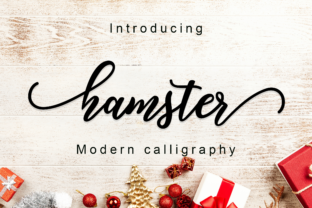
So, what exactly is Hamster Script? In simple terms, it's a digital font that mimics the flow and character of elegant, relaxed handwriting. Unlike rigid, geometric typefaces, Hamster Script features gentle curves, varying stroke weights, and a natural baseline rhythm that feels organic. Its core appeal lies in its ability to look sophisticated without being stuffy, and friendly without being casual. This balance makes it incredibly versatile.
The real magic, however, is in its extended feature set. When we say it comes "loaded with stunning swashes and alternates," we're referring to the extra glyphs included in the font file. Swashes are those beautiful, flowing extensions on certain letters—like a gracefully curved tail on a 'y' or an elaborate flourish on a capital 'Q'. Alternates are different versions of the same letter. This means you can have two or three styles of a lowercase 'a' or 'g', for instance. By mixing and matching these alternatives within your text, you can avoid the monotonous, repetitive look that plagues many script fonts and create compositions that feel uniquely hand-drawn.
Why This Font Solves Common Design Problems
Imagine you're a small business owner creating a logo for your boutique bakery. You want it to feel homemade and heartfelt, but also professional. A basic script font might get you halfway there, but often looks too uniform or digitally cold. With Hamster Script, you can select a swashy capital 'B' for your business name and use a softer alternate for the following letters, injecting immediate personality and a craftsperson's touch. It solves the problem of generic branding.
Or perhaps you're a blogger or educator designing a webinar invitation or a course workbook. You need the material to be engaging and approachable, encouraging participation rather than just broadcasting information. Using Hamster Script for headings, key quotes, or call-out boxes can make your content feel more conversational and personally addressed to the reader. It bridges the gap between formal publication and friendly communication.
Practical Applications Across Fields
The value of Hamster Script extends far beyond just looking pretty. Its characteristics support specific goals and needs in various contexts.
For freelancers and creatives, such as illustrators or wedding planners, it can be the perfect typeface for client proposals, portfolio websites, or custom stationery. It elevates personal correspondence and marketing materials, helping to build a brand that feels both skilled and sincere.
In digital content creation, think about YouTube channel art, Instagram story graphics, or the headlines on your newsletter. In a space crowded with bold, sans-serif fonts, using Hamster Script for key messages can create a moment of visual calm and personal connection, making your content stand out in a feed.
Even in lifestyle and personal projects, its utility shines. Designing a family recipe book, creating custom greeting cards, or crafting a unique birthday invitation are all opportunities where Hamster Script’s smooth, personal touch can transform a simple document into a memorable keepsake.
Getting Started: A Few Friendly Considerations
If you're new to using fonts with advanced features like swashes and alternates, the process is quite accessible. Most modern design software, like Adobe Illustrator, Affinity Designer, or even Canva (via manual adjustment), allows you to access these alternate characters through a glyph panel or character viewer. You don't need to be an expert typographer; you can simply click to replace a standard letter with its more decorative version. Start by experimenting on a single word or headline. Try applying a swash only to the first and last letters for a balanced, classic look.
An important thing to remember with any script font, including Hamster Script, is readability. Its strength is in evoking feeling and style, not in presenting dense paragraphs of body text. Use it purposefully for titles, logos, short quotes, accents, and decorative elements. Pair it with a clean, simple font for your main text to ensure your overall design remains clear and easy to consume.
Ultimately, choosing Hamster Script is about choosing a tool for intentional design. It won't be the answer to every typographic need, but for those projects where warmth, craftsmanship, and a human touch are your primary goals, it provides a beautiful and flexible way to achieve that look. By leveraging its built-in swashes and alternates, you can create work that avoids the clichés of digital script fonts and feels genuinely personal, one letter at a time.