Mistrully Script: The Handwritten Brush Font for Elegant Projects
Finding a font that genuinely feels organic and expressive can be a surprisingly difficult task. Many designers and business owners seek a handwritten touch for their branding, but they often end up with fonts that look generic or fail to deliver the needed sophistication. This is where a specialized brush script like Mistrully Script makes a significant difference. It’s not just another handwriting font; it’s a crafted typographic tool designed to bring an authentic, fluid elegance to your work.
If you’re considering Mistrully Script for a project, you’re likely looking to communicate personality, warmth, or luxury. Its unique style, complete with amazing swashes, offers a level of detail that standard script fonts lack. However, to truly benefit from its potential, you need to understand its proper application and avoid some common pitfalls that can undermine your design’s effectiveness.
Understanding the Unique Appeal of Mistrully Script
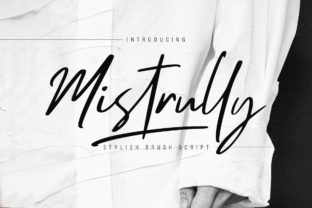
Mistrully Script stands out because it captures the irregular, dynamic feel of real brush pen calligraphy. This isn't a rigid, perfectly uniform script. The variation in stroke weight and the inclusion of those graceful swashes mean it carries visual interest and a sense of human craftsmanship. It’s perfect for projects where you want to avoid a cold, corporate feel—think wedding invitations, boutique brand logos, artisanal product packaging, or social media content that aims to feel personal and engaging.
A common oversight is treating Mistrully Script like any other decorative font. If you simply drop it into a headline without considering its context, you risk creating a disconnect. For example, using it on a technical manual or a minimalist tech startup website would likely feel incongruous. Its strength lies in evoking emotion and connection. Before downloading or purchasing, ask yourself: does my project’s message align with the elegant, personal vibe this font provides?
Common Mistakes When Applying Brush Script Fonts
Even with a beautiful tool like Mistrully Script, poor application can lead to disappointing results. Let’s explore some frequent errors and how to sidestep them.
Overusing Swashes and Flourishes
The swashes in Mistrully Script are a fantastic feature, but they are accents, not the main event. A common mistake is applying them to every single letter in a word or using them in every instance of the font. This creates visual clutter and can make the text difficult to read. The swashes are designed for selective enhancement—perhaps on the opening and closing letters of a word, or on capital letters in a logo. A better approach is to use the standard glyphs for most of your text and employ swashes sparingly to create focal points and add elegance without overwhelming the viewer.
Ignoring Readability in Longer Text
Mistrully Script is a display font. Its primary role is for headlines, logos, short quotes, and prominent design elements. A significant misunderstanding is attempting to use it for body text, like paragraphs on a website or lengthy product descriptions. The detailed brush strokes and variable baseline can severely hinder readability at small sizes and in large blocks. For a cohesive design, pair Mistrully Script with a clean, neutral serif or sans-serif font for your body content. This pairing lets the script shine where it matters while ensuring your message is communicated clearly and comfortably.
Neglecting Proper Spacing and Alignment
Handwritten-style fonts often require manual adjustment to look their best. Assuming that the default kerning (space between letters) will be perfect for every word you type is a trap. Words like “love” or “style” might need slight tightening or loosening of letter spacing to look balanced. Furthermore, because it mimics brush writing, characters don’t always sit on a perfectly mechanical baseline. For a logo, you might need to individually adjust the vertical alignment of letters to create a harmonious flow. Don’t just accept the default layout; spend a few minutes fine-tuning the spacing to achieve a natural, polished look.
Practical Advice for Successful Implementation
To ensure Mistrully Script elevates your project, follow some straightforward, practical steps during your design process.
First, always check the font’s character set and OpenType features before you commit. OpenType features control the alternate glyphs and swashes. Ensure your design software (like Adobe Illustrator, Photoshop, or InDesign) supports these features and that you know how to access them. This knowledge lets you leverage the full versatility of the font, switching between standard and swash letters effortlessly.
Second, consider color and background contrast. The delicate thin strokes of a brush script can vanish on a busy background or with poor color choice. For instance, using a light grey Mistrully Script on a white background will lose impact. Opt for strong contrast. A deep navy script on a cream background, or even white script on a dark photographic background, can make the elegance pop. Test your color choices at the actual size they’ll be used.
Third, respect the font’s tone. Mistrully Script conveys elegance, creativity, and personal touch. Forcing it into a context that demands austerity or hyper-modernism will confuse your audience. Match the font to your project’s core emotional message. If you’re designing for a wedding, it’s a perfect fit. If you’re designing for a financial audit report, it’s not. This alignment is crucial for effective communication.
Evaluating and Testing Before Final Use
Before making Mistrully Script a permanent part of your branding or key project, conduct a simple usability test. Create mockups of your main assets—the logo, the advertisement, the packaging label. Then, ask a few people who represent your target audience to look at them. Do they comment on the beautiful writing? Or do they struggle to read the company name? This real-world feedback can highlight issues with readability or tone that you might have missed while immersed in the design process.
Also, compare it against other brush scripts you might own or have considered. Does Mistrully Script’s specific flow and swash set offer something unique that better suits your vision? Often, the subtle differences in letterforms can make one font feel “just right” while another feels slightly off. This careful comparison ensures you’re not using a generic alternative when a tailored option like Mistrully Script exists.
Final Thoughts on Making the Right Choice
Choosing a font is a foundational design decision. Mistrully Script is a powerful tool for specific, emotion-driven projects. By understanding its nature as a display font, using its special features judiciously, pairing it appropriately with supporting typefaces, and rigorously testing its application, you can avoid the common errors that lead to messy, ineffective designs. When used with intention and care, Mistrully Script can add that unique, handwritten touch that makes your branding, wedding designs, and social media posts feel authentically crafted and memorable.