Nine6brush Procreate Lettering Brushes for Creatives
If you’re a lettering artist, calligrapher, or type designer working on iPad Pro with Procreate, you know the power of a good brush. The default toolkit is excellent, but sometimes you need a specialized tool to push your work further, to achieve a texture or style that feels uniquely yours. That’s where the Nine6brush Procreate Lettering Brushes add-on comes into play. This curated collection isn’t just more brushes; it’s a deliberate expansion of your creative vocabulary, designed specifically for typography work.
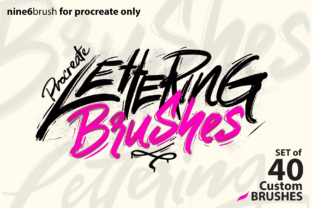
The core offering is a robust set of 40 custom brushes, split into two purposeful groups: the Nine6brush set of 24 and the Nine6lettering set of 16. This isn’t a random assortment. Each brush is crafted to address specific stylistic needs, making it easier to experiment and finalize designs without endlessly tweaking settings. The variety is impressive and practical, covering styles from elegant Script and painterly Wet Paint to gritty Grunge, playful Chalk, dynamic Light Trails, and even functional textures like Rope and Grid. You’ll find tools for creating Neon glow effects, Sparkling accents, clean signature lines, transparent overlays, ghosted impressions, ink-like strokes, and whimsical kiddy textures. The naming, from Brush 1.0 to Brush 16.0, suggests a logical progression and refinement, allowing you to quickly find and deploy the right tool for the task at hand.
Why a Specialized Brush Set Matters for Typography
General painting brushes can create lettering, but brushes designed for lettering consider the flow, pressure, and taper inherent to forming characters. They mimic real-world tools like pens, brushes, and markers with digital precision. For professionals and hobbyists alike, this translates to less time fighting the software and more time realizing your vision. The Nine6brush Procreate Lettering Brushes essentially give you a shortcut to authenticity. Whether you’re crafting a logo that needs a gritty, hand-made feel or a wedding invitation requiring soft, script elegance, having a dedicated brush that behaves correctly from the first stroke is invaluable.
Think of it as upgrading from a basic kitchen knife to a chef’s specialized set. You can still cook with the former, but the latter makes the process smoother, faster, and the results more consistent and impressive. In a fast-paced creative or commercial environment, that efficiency directly impacts productivity and client satisfaction.
Practical Applications Across Creative Fields
The utility of these brushes extends far beyond casual doodling. For freelancers and entrepreneurs, they are a branding powerhouse. Creating unique lettering for social media graphics, website headers, or product labels becomes a more streamlined process. The varied styles allow you to maintain a cohesive yet dynamic visual identity across different mediums—using a clean Line brush for a minimalist blog title and a vibrant Paint brush for an energetic promotional poster.
Marketers and content creators can leverage these tools to produce eye-catching text elements that boost engagement. A well-crafted, neon-style quote graphic or a chalkboard-style announcement stands out in a crowded social feed. The Ghost or Transparent brushes can be used for subtle watermarks or layered text effects in video thumbnails.
For educators and bloggers, these brushes offer a way to personalize educational materials or blog imagery without needing extensive design software. Creating custom worksheets, presentation slides, or article featured images with hand-lettered titles adds a personal touch that resonates with audiences.
From Concept to Final Design with Greater Variety
A common challenge in digital lettering is the sameness that can creep in when relying on a limited set of tools. The Nine6brush Procreate Lettering Brushes set directly addresses this by providing what feels like a full workshop. You can explore a grunge aesthetic for a music festival poster, switch to a rope texture for a nautical-themed logo, and then use a sparkling lamp effect for a celebratory headline. This variety within one package encourages experimentation without the need to source, purchase, and manage multiple brush sets from different creators, saving both time and money.
Installation and Key Practical Considerations
Adding these brushes to your Procreate workflow is straightforward, but paying attention to the steps ensures a smooth setup. The file is provided as a .brushset package. First, download and extract the .zip file, typically requiring a computer or an app like iZip on your iPad. After extraction, save the resulting .brushset file to a cloud service like Dropbox or Google Drive.
Then, on your iPad, open the Files app, navigate to the saved location, and tap the file. Procreate will automatically import the entire brush set. A crucial note: do not use the Import function within the Brushes panel itself. That function is for single brushes and will not recognize the .brushset package, leaving the file greyed out and unusable. Following this correct path ensures the set arrives intact and organized within your Procreate brush library.
When evaluating this or any brush add-on, consider your specific needs. The Nine6brush set shines in its typographic focus and style range. It’s a strong choice if your work frequently requires diverse lettering textures and you value having a comprehensive, ready-to-go toolkit. For those who specialize in a single, very specific style, a smaller, hyper-focused set might be preferable. However, for most lettering artists and designers who tackle varied projects, the breadth and professional curation here offer significant practical value.
Enhancing Your Creative Process
Ultimately, tools like the Nine6brush Procreate Lettering Brushes are about removing technical barriers and expanding creative possibility. They allow you to focus on design, composition, and message rather than the mechanics of simulating a brush effect. The result is work that feels more confident, varied, and professionally executed. For anyone using Procreate for typography—from hobbyists exploring a new passion to professionals delivering client work—this add-on serves as a meaningful upgrade to your digital studio, empowering you to create with greater ease, speed, and stylistic range.